Look up a seat or table
See who bought a seat and whether they're in.
- On the scan screen, tap LOOK UP A SEAT.
- Type the table or seat as it shows on the ticket, like Table 12 or 101 C 4, and tap FIND.
- You'll see the seat, the buyer's name, the order number, and a green IN tag with the time, or a gray NOT IN YET tag.
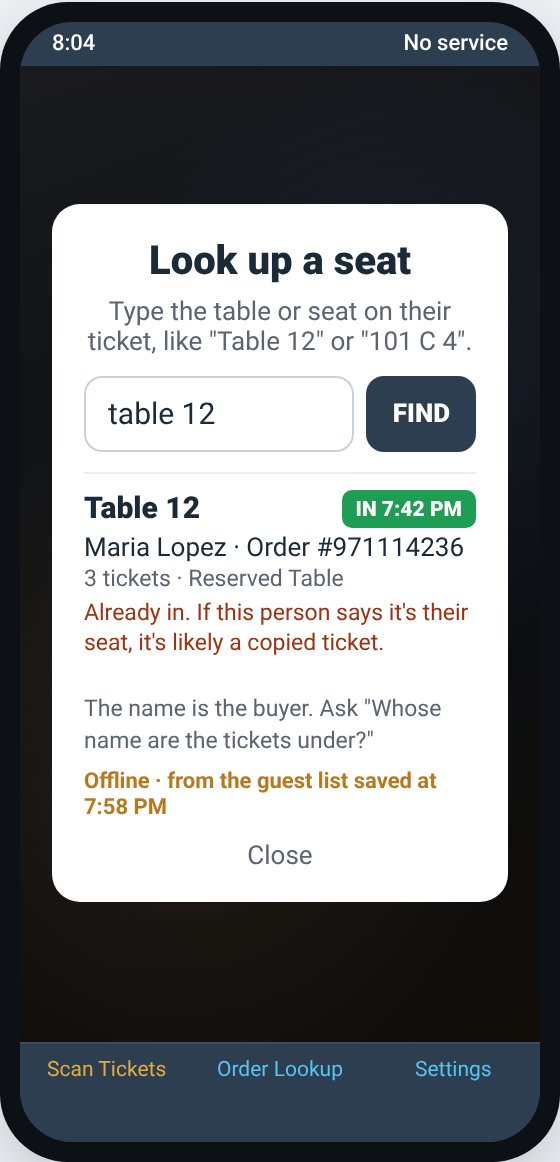
- The name is the buyer. Ask "Whose name are the tickets under?"
- If a seat is already in and someone else says it's theirs, it's most likely a copied ticket.
- It works with no signal too, from the saved guest list. Seats sold in the last few minutes won't show until the phone has signal.
- The guest list search on the website and in the app's Order Lookup finds tables too. Type Table 7.
Still stuck? Call 713-303-4094 or send us a message.