Section prices and tiers
Set the price of each section of your seat map.
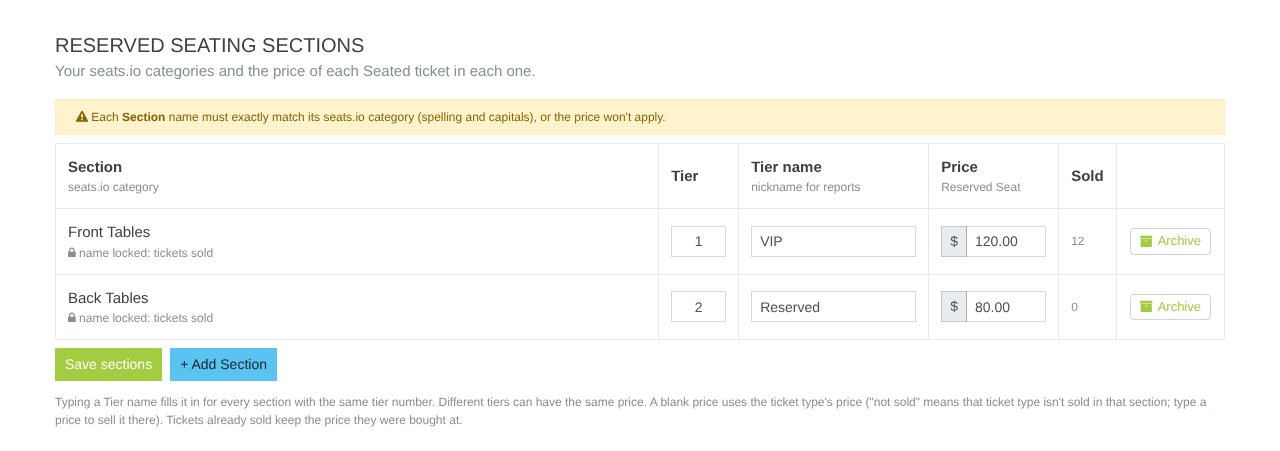
- Click + Add Section.
- Type the Section name exactly as it is on the seat map (same spelling and capitals), or the price won't apply.
- Optional: a Tier number and Tier name (e.g. "VIP") to group sections in reports.
- Enter a Price for each Seated ticket. Blank uses the ticket's default price. "not sold" means that ticket isn't sold there.
- Click Save sections.
- Tables are priced per seat (a table for 6 at $50 = $300).
- Tickets already sold keep the price they were bought at.
- A section name locks once tickets have sold in it.
Still stuck? Call 713-303-4094 or send us a message.