Block tables for guests
Take tables off sale for sponsors, VIPs or staff. No charge, and they get scannable tickets.
- Open the My Events menu (top right) → Block Tables.
- Pick the Event and Show day.
- Tick the tables or seats. Use Find to jump to a number.
- Type who it's for in Reserved for. Add a Guest email to send them the tickets.
- Click Block these.
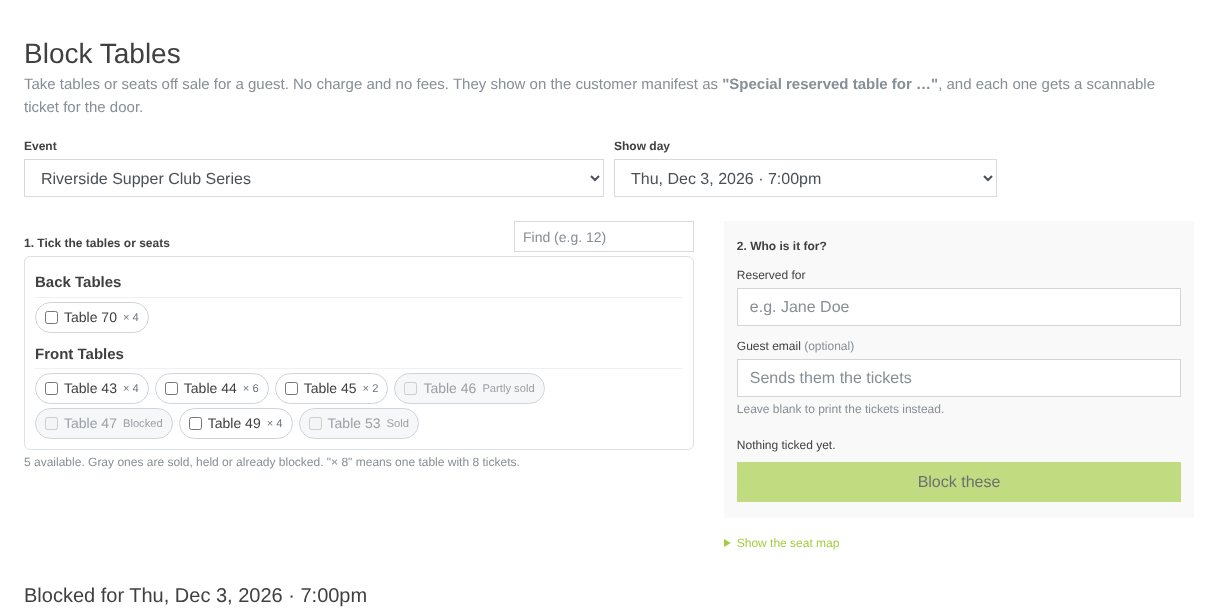
They show on the Customer Manifest as "Special reserved table for …". Under the list: Print tickets, or Unblock to put them back on sale (their tickets stop working).
Tip: If a blocked table shows Block again, it was put back on sale on the seat map. Click it to block it again.
Still stuck? Call 713-303-4094 or send us a message.