At a Glance
Your event's sales, capacity and check-ins on one page.
- Open Manage Events.
- Click the pie-chart icon (At a Glance Report) next to the event.
Who can do this: Promoter Admin, Customer Service and View Only logins (not Promoter Assistants).
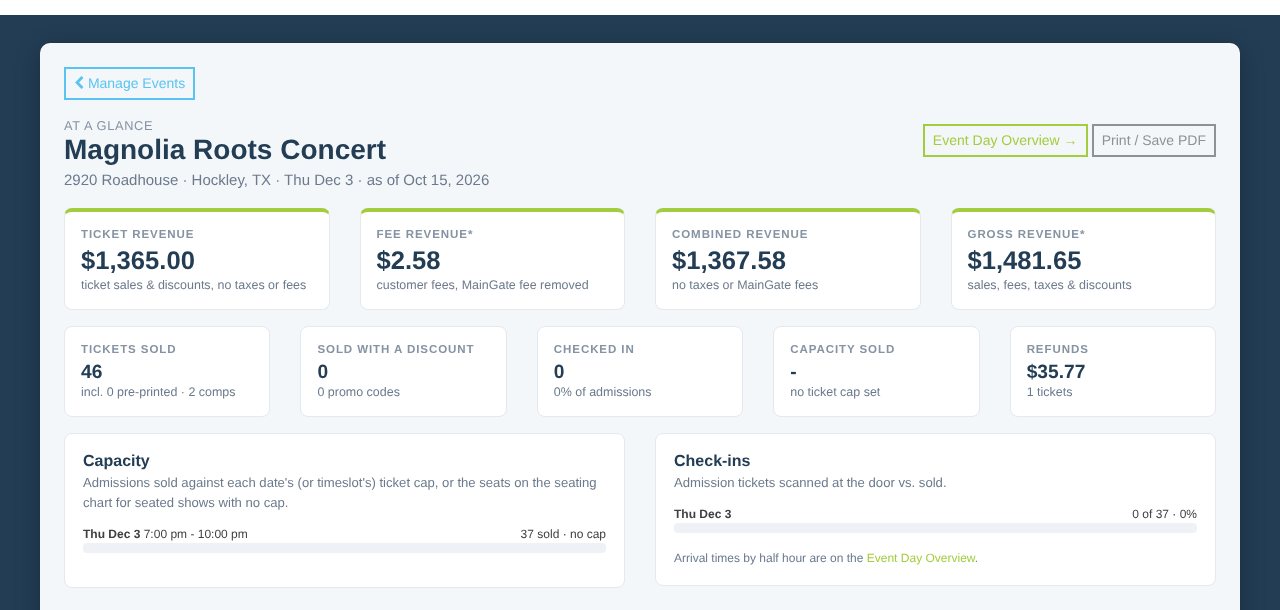
You'll see ticket and fee revenue, tickets sold, check-ins, capacity left, sales over time and each date. Click Print / Save PDF to keep a copy, or Event Day Overview for one day in detail.
Compare with other events
Further down, Compare with other events lines up this event's running sales against your past events by days before opening day, so you can see if you're ahead or behind.
Events that sell bundles also get a Bundles sold tile and a table of bundles and the tickets inside.
Still stuck? Call 713-303-4094 or send us a message.